tb323fu-linux
On this page
Mainline Linux on the Lenovo Legion Tab Gen 5 / Legion Y700 5th Gen (model TB323FU, Snapdragon 8 Elite Gen 5, SM8850 "kaanapali", board "baldur"). The same model number is used in China and elsewhere; the firmware region (PRC / ROW) differs, not the hardware.
Website: joonhoekim.github.io/tb323fu-linux
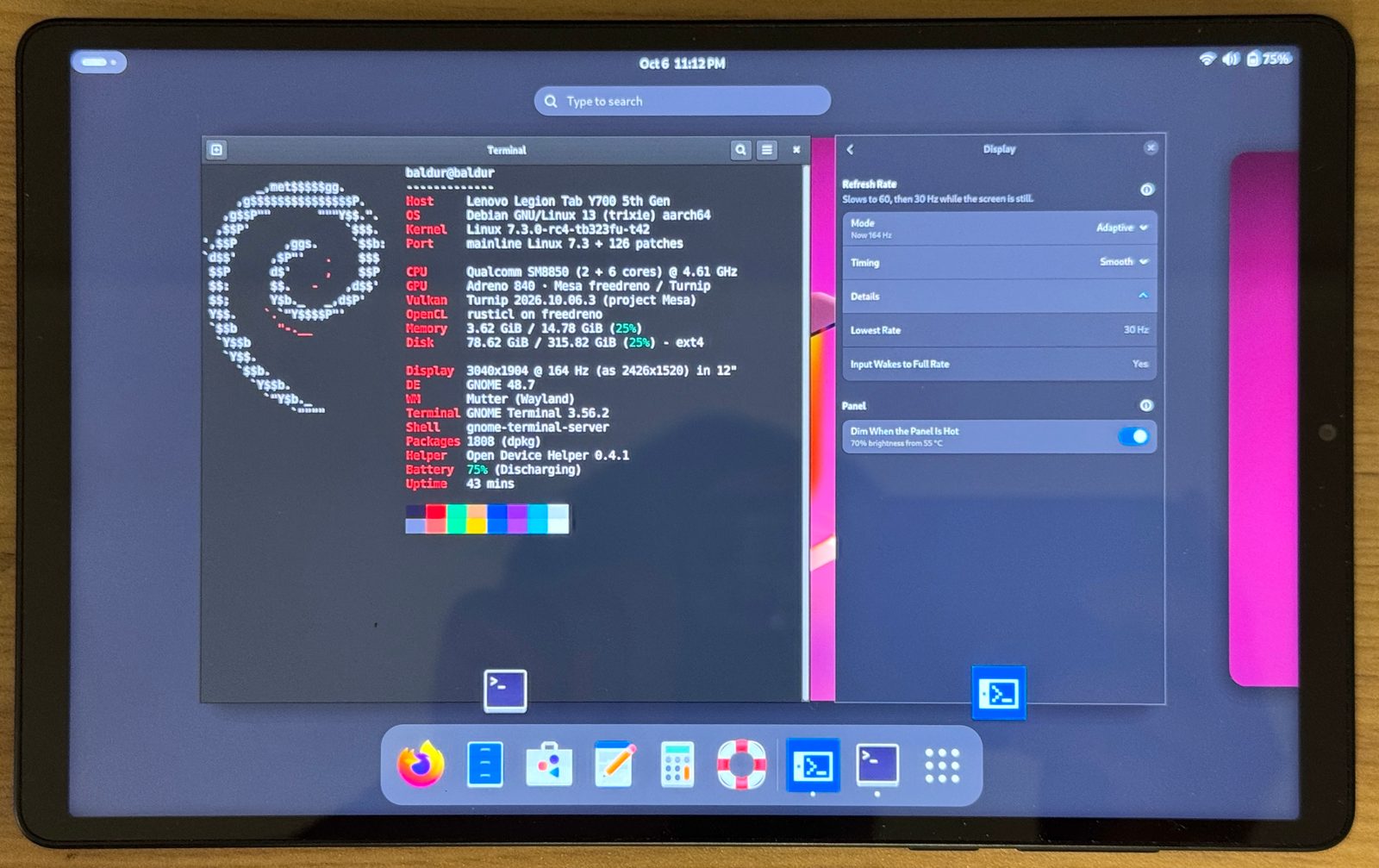
Status: work in progress — not ready for everyday use.
Android firmware: stay on ZUI 18.0.12.104. The kernel has only been tested on that firmware. On 18.0.12.187 it hangs during boot (#9), and a firmware update cannot be undone. Keep the OTA apps disabled (Rooting).
What this is#
The main product is the kernel port: a patch series on top of a fixed upstream base, the board device tree, and the kernel config. Distribution and desktop integration (a Debian/GNOME image, services, udev rules) are provided as an optional add-on, not a requirement — the kernel does not assume a particular distribution or desktop.
Where to start#
| You want to | Read |
|---|---|
| know what works | Hardware status — a feature is marked as working only after it was checked on the device (measured, or seen/heard by a person); "the driver probes" does not count |
| see which distributions boot | Distributions |
| start: root the tablet (step 1 of the install) | Rooting: back up the whole tablet, root Android without unlocking (LTBox, KernelSU); host setup per OS. When something goes wrong: Recovery |
| install Linux after rooting | Installing Linux — the whole path, then one guided script (tools/install/) from your PC: Windows, Linux or macOS; result: Ubuntu with GNOME on the microSD card |
| switch, update or remove Linux once it runs | After installing: switching to Android and back, kernel and helper updates, more systems on the card, going back to stock, a symptom index |
| install another distribution, your own kernel or a root on the internal storage | Installing by hand (every step as commands, each marked verified / from records / untested) |
| build or review the kernel | kernel/, PROVENANCE.md, initramfs |
| put together a root filesystem | platform files, firmware, rootfs/ builders (arm64 host, or x86-64 Linux with qemu-user-binfmt — WSL2 with Ubuntu works, see install) |
| make Vulkan and OpenCL faster (optional) | After installing → the project's Mesa: its own Mesa build for this GPU, switched on in Open Device Helper; the default stays the distribution's Mesa |
| change the tablet's own settings | Open Device Helper: charging, refresh rate, performance and thermal profiles, LED ring, multiboot, kernel updates, … |
look up a term (boot_b, state root, trial, EDL, …) | Glossary |
| know the open problems | Known issues: CPU cluster idle state (worked around), 165 / 144 Hz, DisplayPort MST, GNSS, low-speed USB devices, … |
Layout#
| Path | Contents |
|---|---|
kernel/ | patch series, base commit, config, board DT, PROVENANCE.md (where every imported patch came from), initramfs/ (the built-in initramfs: USB way in, boot summary, multiboot root selection) |
firmware/ | manifest (file, sha256, source on the device) and a script that extracts the firmware from your own tablet — no firmware files are stored here |
rootfs/ | optional: scripts that build root filesystems for the multiboot partitions — which ones and their status: docs/distros.md |
userspace/ | platform/: distribution-neutral platform files every install needs (udev, systemd units, audio/UCM, sensors, emergency key) with install.sh; desktop/: optional desktop extras |
helper/ | Open Device Helper: tb323fu-helperd (system D-Bus), tb323fu-ctl, the tb323fu-settings app (docs/helper.md) |
packaging/ | Debian (build-debs.sh), Arch (PKGBUILD) and Nix (flake.nix at the root) recipes |
android/ | Android-side helpers (switching between Android and Linux; how to switch: docs/after-install.md) |
tools/ | build and flash scripts |
docs/ | documentation (see Where to start) |
Support#
If this project is useful to you, you can support the work:

Starring the repository on GitHub helps too: it makes the project easier for other TB323FU owners to find.
Contributing#
Reports from your own tablet — what works and what does not, with logs — are as useful as code: post them in Device reports. Questions go to Q&A, bugs you can reproduce to issues, and pull requests are welcome. Contributions are taken under the license of the file they change, with a DCO sign-off; see CONTRIBUTING.md.
License#
Every file's SPDX header takes precedence; files without one are covered by REUSE.toml, otherwise by the MIT LICENSE. The repository passes reuse lint (REUSE 3.3).
NOTICE has the full map, the copyright holders and the third-party code; the license texts are in LICENSES/.
| Part | License |
|---|---|
| helper (daemon, CLI, helper core, Open Device Helper app and their data files) | GPL-3.0-or-later |
| kernel patches and config fragments | GPL-2.0-only, as the kernel; imported patches keep their original authors and Signed-off-by lines (see kernel/PROVENANCE.md) |
board device trees (kernel/dts/) | BSD-3-Clause, as upstream qcom device trees |
out-of-tree aw882xx driver | GPL-2.0-only (AWINIC's headers kept; they use the older identifier GPL-2.0) |
| GNOME Shell extension | GPL-2.0-or-later, as GNOME Shell |
| platform files, root filesystem builders, tools, packaging, site code | MIT (a few platform files follow their upstream: UCM2 BSD-3-Clause, libcamera tuning CC0-1.0, feedbackd rule LGPL-2.1-or-later) |
| documentation text | CC-BY-SA-4.0; code snippets and commands in the documentation are also available under MIT |
Firmware is not redistributed, and neither are Valve's Steam client, the SteamOS-ARM image or distribution base images: the builders download them on your machine. The project name, icons, update source and any signing keys are covered by the name and trademark policy; forks and modified builds use their own. This is an independent community project, not affiliated with Lenovo, Qualcomm or Valve; their names are used only to identify the device and the software it works with.
Acknowledgements#
Built on the community kaanapali-mainline tree and the work referenced in kernel/PROVENANCE.md.
The code and documentation were written with the help of large language models.
Every change was reviewed by the author, and a feature is marked as working only after it was checked on the device.